A Step-by-Step Guide to Creating Product Photos Without a Photoshoot
A Step-by-Step Guide to Creating Product Photos Without a Photoshoot
Running an e-commerce clothing brand in India comes with a major bottleneck: product photography. Booking models, setting up lighting, renting studio space, and scheduling photoshoots are expensive and time-consuming tasks. What if you could bypass all of that and generate professional product images straight from your smartphone?
Welcome to Easyfit AI, the AI-powered virtual trial room trusted by over 100+ Indian sellers. Using advanced Google Gemini AI technology, Easyfit AI allows you to create ultra-realistic try-on images for Sarees, Kurthis, Gowns, and over 300+ Indian dress styles.
Here is your step-by-step guide to generating stunning product photography without a traditional photoshoot.
Step 1: Set Up Your Easyfit AI Studio
Download the Easyfit AI mobile app and log in. This platform provides much more than just AI; it equips you with a fully customized storefront and an admin console to manage your catalog seamlessly.
Take a look at the intuitive user interface in image_4e8108.png to see how easily you can track your business performance, credits, and AI generations right from your dashboard.
Step 2: Snap a Simple Photo of Your Garment
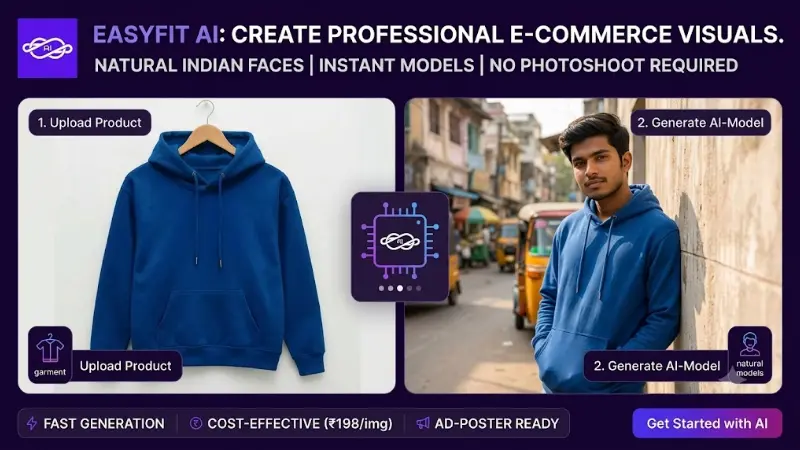
You no longer need a live model to launch a product. Simply take a clear, well-lit photograph of your garment laid flat or hung up.
Step 3: Choose Your AI Generation Mode
Easyfit AI offers two powerful, no-prompt AI generation modes tailored for clothing sellers:
- Cloth On Me: Upload your garment photo and a photo of a person. The AI seamlessly drapes the garment onto the person, perfectly preserving the exact color, pattern, fabric texture, sleeve length, and fit—all while keeping the model’s identity and background untouched.
- My Face In Model Body: Want a specific look? Upload a face, and the AI will blend it onto a professional model's body wearing your garment, automatically matching skin tone, lighting, shadows, and head angles.
Step 4: Let Gemini AI Do the Magic
Hit generate! Under the hood, Easyfit AI utilizes cutting-edge Google Gemini models to process your request. Within seconds, your raw garment photo is transformed into a high-quality model photoshoot, saving you thousands of rupees and days of work.
Step 5: Publish, Share, and Sell
Once your image is generated, you can instantly add it to your built-in E-Commerce storefront. Easyfit AI handles your product variants, sizes, and colors. Your customers can even use the "AI Trial Room" on your website to try the clothes on themselves before buying!
The Future of E-Commerce is Here
Say goodbye to expensive studios. With Easyfit AI, your custom-branded shop, SEO-optimized marketplace, and AI photography studio are all in one single platform.
Ready to take action?
Start implementing the exact methods outlined in this guide.
Start Your AI Photoshoots Now - Just ₹599/month