
From One Photo to a Full Showroom — How EasyFit AI's Product Upload Works
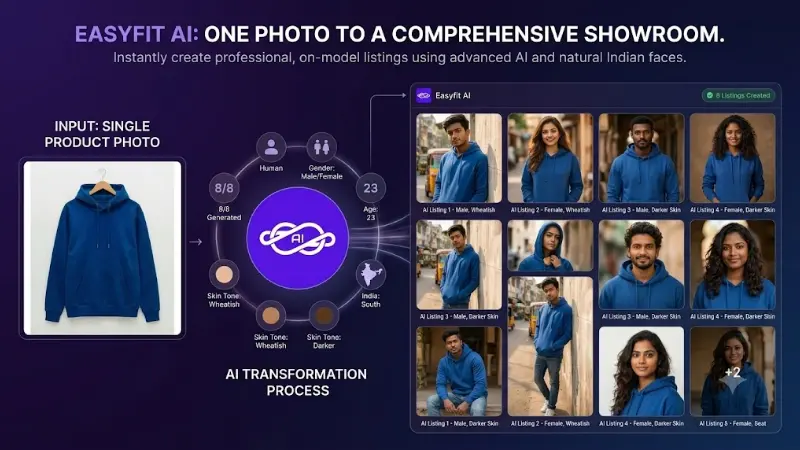
For Indian e-commerce sellers, putting together a professional product catalog has always been a bottleneck. Hiring models, renting out studios, and managing professional lighting setups can quickly drain a budget. But what if you could bypass the photoshoot entirely and go from a single flat photo of a garment directly to a live showroom listing?
With Easyfit AI, that’s exactly what you can do. Trusted by over 100 Indian sellers, the Easyfit AI platform serves as a "no-prompt AI photoshoot app," empowering store owners to create high-quality, professional model images in just a few taps.
The Magic of the AI-Studio
As shown in our mobile app interface, creating a listing is a beautifully streamlined process. We utilize Google's advanced Gemini AI models to do the heavy lifting. Here is how the process flows from a single garment photo to a ready-to-sell listing:
Step 1: Snap & Upload You don't need a professional camera. Simply take a clear picture of the garment—like a hoodie, kurthi, or saree. Upload this base image directly into the Easyfit AI Flutter app.
Step 2: Configure Your Virtual Model Inside the AI-Studio, you have complete control over the visual direction of your product image:
- Model Selection: Choose whether you want a human model, a mannequin, or a ghost mannequin effect.
- Custom Attributes: Tailor the model's appearance to your target demographic by adjusting the age (e.g., 23 years old), region (e.g., South India), and skin tone (e.g., Wheatish).
- Lighting & Style: Pick the perfect lighting (Day Light, Night Light, or Auto) and body type to ensure the final image matches your brand's aesthetic.
Step 3: Generate with Gemini AI Once your parameters are set, hit Generate Now. Easyfit AI's robust backend (powered by Firebase Cloud Functions and Gemini AI) works its magic. It intelligently drapes your uploaded garment onto the generated model, preserving the exact color, pattern, and fabric texture, while seamlessly blending shadows and lighting.
Step 4: Launch Your Showroom Listing With your professional model image ready, publishing it to your store takes seconds. You can immediately:
- Set the product title, cost, and weight.
- Configure product variants, sleeves, and categories.
- Generate an Ad Poster for WhatsApp or social media marketing.
- Publish the product instantly to your Next.js-powered Easyfit storefront.
A Complete Ecosystem
Easyfit AI is more than just an image generator; it is a full multi-tenant e-commerce ecosystem. Every product you upload becomes part of an SEO-optimized storefront complete with a shopping cart, Razorpay/PhonePe integrations, and automated WhatsApp order alerts. Plus, your end-customers get to use the AI Trial Room themselves to see how the clothes look on their own photos before they buy!
Ditch the studio and embrace the future of e-commerce cataloging. With Easyfit AI, your next bestseller is just one photo away.
Ready to take action?
Start implementing the exact methods outlined in this guide.
Start Your AI Showroom for ₹599/month