
Why WhatsApp Photos Are Costing You Customers (And What to Do Instead)
Why WhatsApp Photos Are Costing You Customers (And What to Do Instead)
If you run an e-commerce brand, a local boutique, or a service-based business, WhatsApp is likely one of your most powerful channels for customer communication. It is fast, personal, and boasts open rates that email marketers would trade their left arm for.
However, if your primary method of showing products to prospective buyers is dumping dozens of photo attachments into a chat thread, you are losing customers every single day.
While sending photos directly on WhatsApp feels convenient for you, it creates friction, skepticism, and decision fatigue for your buyers. Here is why relying on raw WhatsApp photos is quietly hurting your sales—and what you should do instead to boost conversions.
1. Aggressive Image Compression Destroys Product Detail
When you snap a high-resolution photo of a handcrafted leather bag, an intricate piece of jewelry, or a sleek piece of apparel, you expect the buyer to see every fine detail.
Unfortunately, WhatsApp’s default algorithm aggressively compresses media files to save bandwidth.
- Blurry textures: Intricate patterns and fine textures get smudged into pixelated artifacts.
- Distorted colors: Compression algorithms shift color gradients, leading to "expectations vs. reality" disputes when the item arrives.
- Unreadable text: If your image includes size charts, specs, or labels, compression frequently renders the text illegible.
When a product looks low-quality in a photo, buyers subconsciously assume the physical product is low-quality, too.
2. Photo Dumps Cause Instant Buyer Fatigue
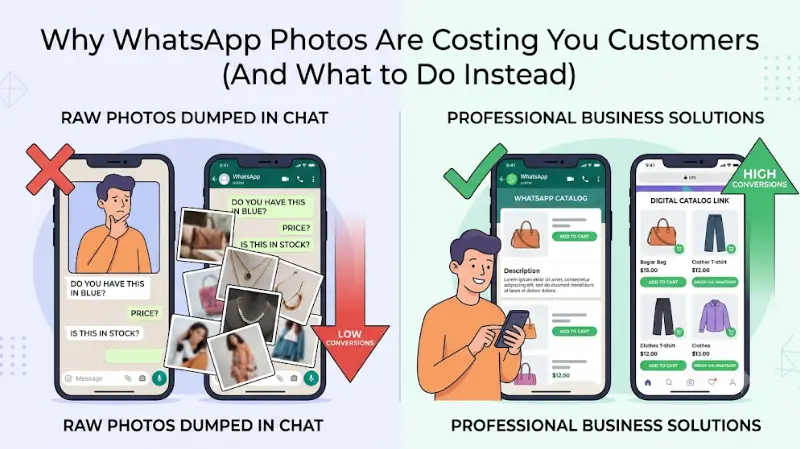
Imagine walking into a physical retail store, asking where the shoes are, and having the salesperson dump 45 shoe boxes onto the floor at your feet.
That is precisely what it feels like when a customer asks, "Do you have any blue dresses in stock?" and gets hit with 20 consecutive image downloads.
- Chat clutter: Important text messages, pricing details, and payment links get buried under an avalanche of media files.
- Storage friction: Customers dislike apps taking up gigabytes of phone storage with auto-downloaded photos.
- No search or filter: A customer cannot easily filter your photos by size, price, or color in a standard chat thread.
The moment buying feels like work, modern shoppers drop off and buy from a competitor who makes the experience effortless.
3. Lack of Context Kills Momentum
An image without context is just an image; it is not a pitch. When you send raw photos, you force the customer into a tedious back-and-forth volley of messages:
- "How much is this one?"
- "Is this available in Medium?"
- "What is the material made of?"
- "How long does shipping take?"
Every unnecessary question gives the buyer time to reconsider, close the app, or get distracted by another notification. High-converting sales flows answer key questions before the customer has to ask them.
4. Growing Consumer Caution Around Media Downloads
Digital safety awareness is higher than ever. With increasing reports of media-based malware, steganography scams, and malicious attachments circulating via messaging platforms, many consumers intentionally disable media auto-downloads or hesitate to download media from business accounts.
If a buyer has to tap "Download" on six different images just to view what you sell, you have added an unnecessary psychological barrier to your checkout process.
What to Do Instead: 3 Better Ways to Show Your Products
Transitioning away from sending raw photos does not mean giving up on WhatsApp as a sales channel. It simply means using professional tools built for conversion.
Option A: Leverage WhatsApp Business Catalogs
If you want to stay strictly within the WhatsApp ecosystem, switch to WhatsApp Business and set up a structured Catalog.
- Organized collections: Group items by category (e.g., "Summer Collection," "Best Sellers").
- Rich details: Attach prices, descriptions, SKU codes, and direct checkout links to every item.
- Single-link sharing: Send a single item card or an entire catalog link in one tap without clogging the chat.
Option B: Use Interactive Digital Catalog Links
For a truly modern shopping experience, send prospective buyers a link to a lightweight, mobile-optimized digital storefront or interactive catalog (e.g., a dedicated web page, Shopify catalog, or micro-store).
- Zero compression: Display full-resolution, crisp images that load instantly without taking up space on the user's phone.
- Self-serve shopping: Allow customers to filter by size, color, price range, and availability.
- Cart building: Let buyers add multiple items to a digital cart and send the finalized order directly back into your WhatsApp chat to complete payment.
Option C: Send Formatted High-Res Links via WhatsApp API
If you are running marketing campaigns at scale using the WhatsApp Business API, avoid heavy media attachments in your broadcast templates. Instead, use crisp single-image header templates that link out to high-converting landing pages built specifically for mobile devices.
The Bottom Line
Selling through WhatsApp should feel like a premium personal shopping session, not a chaotic file transfer.
By replacing messy photo dumps with structured WhatsApp Catalogs or sleek mobile web links, you eliminate buyer friction, preserve your brand’s value, and turn casual inquiries into completed transactions.